
Bushnell Golf Mobile
Foresight Sports!Sports
4.4550.00 Reviews
- Version
- 3.0.6
- Installs
- 100.00K
- Age Rating
- Everyone
Screenshots
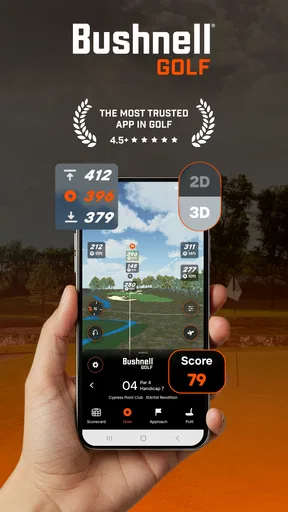
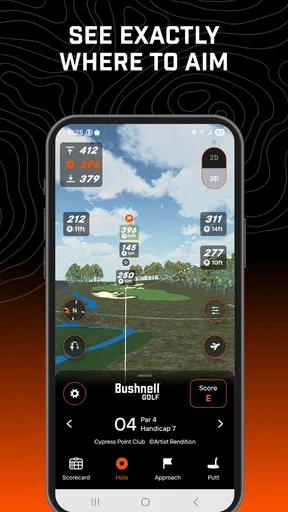
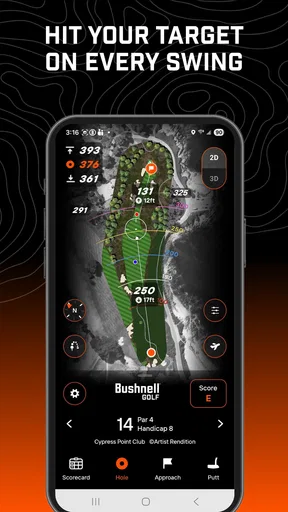
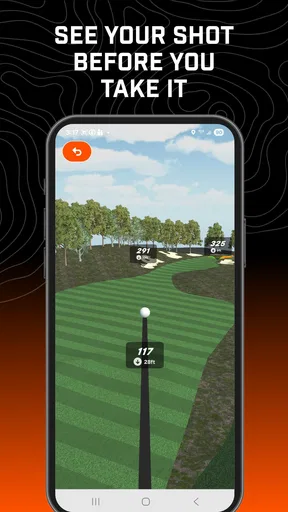
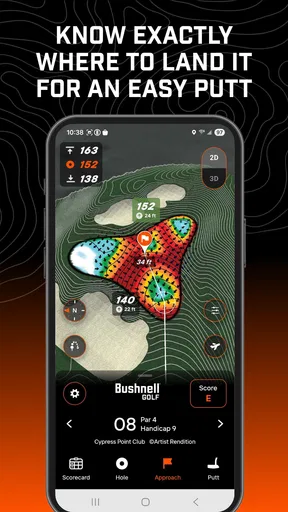
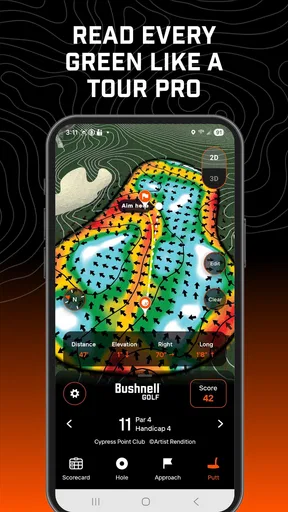
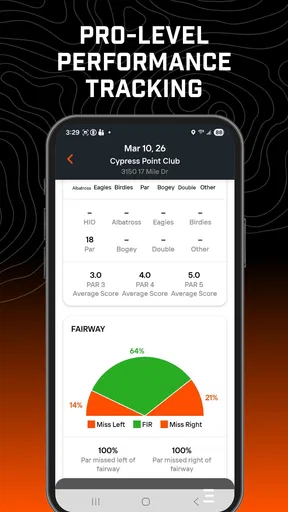
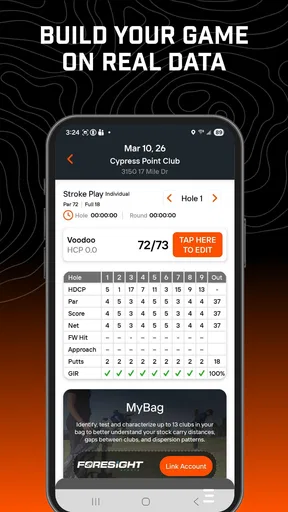
Our Review of Bushnell Golf Mobile
 Analysis by Appyee
I found Bushnell Golf Mobile most useful when I stopped treating it like a full golf game or a complicated coaching platform and used it for one clear job: helping me make sense of distance while I play. That narrow focus is also its appeal. The app is built for golfers who want a more practical view of their shots and club choices without carrying a separate notebook or relying only on guesswork. Its store summary, “Distance made simple,” is a fair description of the experience, although the simplicity depends on setting it up carefully.
This is a free sports app from Foresight Sports!, available for everyone and supported on devices running Android or iOS version 9 or later. It has reached over one hundred thousand installs and holds a 4.4 average from around eight thousand ratings, so it is not an obscure experiment. I also noticed that the free download is not the whole commercial picture: in-app purchases range from about ten dollars to one hundred dollars per item. That makes it worth understanding what you actually need before committing to anything inside the app.
What Bushnell Golf Mobile feels like in real use
My first impression was that the app makes the most sense as a companion for an existing golf routine. It is not trying to replace the feel of standing over a ball, reading a lie, or learning how your swing behaves under pressure. Instead, it gives distance information a more visible place in the decision-making process. That can be valuable for a beginner who is still learning how far each club travels, but it can also help a more experienced player notice patterns that are easy to forget between rounds.
The important distinction is between a distance number and a useful decision. Seeing a yardage is only the beginning. The real benefit comes when I use that information to choose a club with less hesitation, compare a comfortable swing with an aggressive one, or review whether my expectations match my actual results. If you only want a quick glance and never adjust your choices, the app may feel unnecessary. If you enjoy turning each round into a small learning exercise, it has more to offer.
I would not install it expecting a rich social feed, a large entertainment layer, or the kind of broad course-management experience found in some alternatives. Its identity is much more focused. That focus keeps the interface easier to understand than an app filled with scorekeeping, community content, lessons, challenges, and equipment shopping, but it also means you should choose it for distance-related use rather than for an all-in-one golf ecosystem.
The current release is version 3.0.6. I found that detail useful because it tells a new user what to look for when checking whether the installed copy is current. The app has been available since May 31, 2021, giving it enough history to feel established without suggesting that every phone or golf setup will behave identically. The practical lesson is simple: install it before your next important round, not while your group is waiting on the first tee.
Who is likely to enjoy it
I think Bushnell Golf Mobile suits three kinds of players particularly well. The first is a beginner who feels uncertain about club distances and wants a calmer way to make choices. The second is a casual golfer who plays often enough to notice inconsistency but not often enough to remember every previous round. The third is a player who already likes Bushnell’s distance-focused approach and wants a mobile part of that routine rather than a paper card or a separate device screen.
It is less convincing for someone who wants detailed swing instruction, a deep statistical dashboard, or a complete replacement for every other golf tool. It may also be a poor fit if you dislike checking a phone during a round. Even a well-designed distance app can become a distraction when the player starts repeatedly refreshing information instead of committing to a shot. I got the best results when I used it briefly, made a decision, and put the phone away.
Getting through the first setup
The safest way to begin is to install the app at home, open it when you have time, and explore the main flow before taking it onto a course. I would not begin by buying anything. First, learn what the free version lets you do, identify the screens you will actually use, and decide whether the presentation fits your habits. The presence of optional purchases means that a few minutes of testing can prevent an unnecessary expense.
During setup, keep your goal narrow. Do you want help choosing a club, a record of how far you tend to hit, or a clearer view of distance during practice? Those are related goals, but they lead to different habits. A first-time user who tries to track everything immediately can create more work than insight. I recommend starting with one club category or one type of shot and expanding only after the basic routine feels natural.
Another useful preparation step is to check the phone itself. Make sure the display is readable outdoors, the battery is in good shape, and the device is comfortable to access without interrupting your pre-shot routine. I would also avoid learning the app for the first time in a rushed group. The app may be straightforward, but golf is full of moments when even a small delay feels larger than it really is.
For a practice session, I suggest opening the app before hitting balls and deciding what you want to observe. For example, you might compare a normal swing with a harder swing, or see whether the distance you assume for a club is close to what you actually produce. The point is not to chase one impressive result. A single unusually long shot can be misleading; a repeatable pattern is more useful.
Finding the first meaningful success
The first success I would aim for is not a perfect round. It is making one confident club decision with less uncertainty than usual. Before a shot, check the distance information, consider the lie and conditions, choose the club that matches your normal swing, and then commit. Afterward, note whether the result supports your choice. That small loop turns the app from a screen you consult into a tool that improves judgment.
Here is a realistic example. Imagine I am playing after work and reach a shot where I usually debate between two clubs. Instead of selecting the longer option because I want the ball to reach the target, I use the distance information alongside my normal carry expectation. If the safer club requires a full swing that I can repeat, I choose it. The app has not made the shot for me; it has helped separate a measured decision from a hopeful one.
Beginners should resist the temptation to compare their numbers with someone else’s. The useful question is not whether a friend hits farther. It is whether my own distance is becoming easier to predict. That is a more honest measure of progress, especially when weather, lie, fatigue, and swing quality change from hole to hole.
A second practical success is learning the difference between a best result and a dependable result. I recommend watching for the distance you can produce without forcing the swing. If the app encourages you to recognize that distinction, it is doing something more valuable than simply displaying a large number. A controlled shot that leaves a manageable next shot is often a better outcome than an occasional maximum effort.
The points that may confuse a new user
The biggest source of confusion is assuming that distance information automatically equals precision. It does not remove the effects of wind, elevation, turf, lie, temperature, ball condition, or an imperfect strike. I treat the displayed information as one input in a decision, not as an instruction that overrides what I can see in front of me. That mindset prevents overconfidence.
Another common mistake is judging the app after one poor shot. If the ball finishes short, the cause may be the swing rather than the distance information. Likewise, a shot that flies farther than expected does not prove that the chosen club is now your new standard. I prefer to look for repeated tendencies across practice or several rounds before changing my club expectations.
New users may also wonder why the app does not feel like a complete digital scorecard. That is because its strongest identity is distance assistance, not a promise to manage every part of a round. If you need detailed scoring, handicap-related organization, social competition, or instructional content, a broader golf application may be a better companion. Bushnell Golf Mobile can still sit beside those tools, but I would not choose it on the assumption that it replaces them all.
The optional purchase structure deserves attention as well. The app costs nothing to download, but individual in-app purchases can range from roughly ten dollars to one hundred dollars. I would read each purchase screen slowly and ask whether the feature solves a problem I already have. A first-time user should not feel pressured to buy before understanding the basic workflow. Free access is enough to decide whether the app’s style suits you; paid options should be considered only after that trial.
Compatibility is another practical question. The minimum operating-system requirement is version 9, which covers many older devices, but compatibility on paper is not the same as a comfortable outdoor experience. A phone may run the app while still having a dim screen, limited battery life, or sluggish performance. If your device is older, test it during practice rather than assuming the experience will be smooth during a busy round.
Three habits that make it more useful
First, use the app to build a personal decision range rather than memorizing one fixed number for every club. On the course, I would rather know the distance I can usually produce with a balanced swing than the longest result I achieved once. This approach makes the information more realistic and helps prevent the familiar mistake of choosing a club based on an exceptional shot.
Second, separate practice from competition. In practice, I can explore how my distances change when I alter tempo or effort. During a serious round, I should use the information quickly and avoid turning every shot into an experiment. That separation keeps the app from slowing me down and makes the numbers more meaningful when they matter.
Third, use the app to challenge assumptions, not just confirm them. If I believe a club is reliable from a certain distance, I can observe whether that confidence survives different lies and levels of fatigue. The insight is not simply “this club goes far.” It is “this club gives me a predictable option under the conditions I usually face.” That is a much more useful conclusion than a single headline distance.
A fourth habit is to prepare a simple pre-shot sequence. I look at the distance, assess the lie, choose a normal swing, and stop checking. This keeps the app in its proper place. It supports the routine instead of becoming the routine. Players who already overthink shots may find this discipline especially important.
How it compares with familiar alternatives
Compared with a paper yardage book, Bushnell Golf Mobile is more flexible and easier to connect with a changing personal practice routine, but paper is faster when you want zero battery concerns and no phone handling. A notebook can also be surprisingly effective for recording club tendencies, especially if you enjoy writing down observations. The app’s advantage is convenience and immediate access; the notebook’s advantage is simplicity and ownership of the record.
Compared with a broad golf app, this one feels less cluttered when the question is distance. A larger platform may be better if you want scoring, social features, course planning, or a more complete round history in one place. I would choose Bushnell Golf Mobile when distance is the problem I am trying to solve, not when I want every golf function gathered under one roof.
Compared with a dedicated rangefinder or other hardware, a phone app is appealing because many golfers already carry a phone. Hardware can feel faster and more purpose-built, while a phone-based workflow may be more familiar for users who prefer a single device. The better choice depends on whether you value a dedicated physical tool or the convenience of keeping the experience on your mobile device.
That comparison also explains why the app is not automatically right for every golfer. Someone who wants instant, hands-free simplicity may prefer hardware. Someone who wants a complete digital golf journal may prefer a broader platform. Someone who is still learning basic club distances may appreciate this focused approach because it gives them one manageable area to improve.
What I would do after the first round
After using it once, I would avoid changing everything at once. I would write down a few observations mentally or in my usual notes: which club decisions felt clearer, where the information did not match the result, and whether checking the phone interrupted my rhythm. Those observations tell me more about the app’s fit than the first round’s score.
If the workflow feels natural, the next step is to use it during a practice session with a specific question. Perhaps I want to know which club gives me the most dependable result when I make a smooth swing. Perhaps I want to understand why two clubs that appear close in distance produce different confidence levels. A focused question keeps the session useful and prevents the app from becoming another source of random numbers.
I would also decide whether the optional purchases are justified only after this trial. The free entry point makes that decision easier because I can judge the basic experience first. If I rarely open the app or still prefer a paper card, paying for additional functionality would not make sense. If it becomes a regular part of my practice and the extra tools solve a clear need, the purchase deserves a more informed look.
For new golfers, my advice is to keep expectations modest and encouraging. You do not need to understand every distance immediately, and you do not need to swing harder because the app shows a number. Use it to make one choice at a time. Over several sessions, that can make club selection feel less mysterious and help you notice progress that a score alone may hide.
For experienced golfers, the value is more subtle. The app is not likely to transform a practiced swing overnight, but it can expose gaps between remembered distances and repeatable distances. That makes it useful as a check on intuition. If your routine is already precise and you have no interest in reviewing those assumptions, you may gain little from adding another screen.
Overall, I see Bushnell Golf Mobile as a focused distance companion rather than a universal golf command center. Its free starting point, Everyone age rating, and clear sports purpose make it approachable, while the optional purchases mean I would explore before spending. The app works best when I use it briefly, combine its information with the actual lie and conditions, and judge success by better decisions rather than bigger numbers.
My recommendation is straightforward: install it before your next practice session, test the basic flow without rushing into purchases, and use one round to see whether it reduces uncertainty. If you want a focused mobile aid for distance decisions, it is worth trying. If you need a complete golf-management system or dislike using a phone during play, a paper routine, dedicated hardware, or a broader alternative may fit you better. The best result is not simply knowing a distance; it is choosing with enough confidence to make the next shot feel manageable.
Verdict
Strengths of Bushnell Golf Mobile
- GPS distances help plan shots on unfamiliar courses.
- Course maps make it easier to identify hazards and landing areas.
- Score tracking keeps rounds organized in one place.
- Useful for golfers who already own compatible Bushnell devices.
- Simple interface makes key information easy to find during play.
Limitations of Bushnell Golf Mobile
- Many features depend on a compatible Bushnell rangefinder or device.
- Course data may be incomplete or outdated in some locations.
- GPS use can drain your phone battery during a full round.
- Requires location permissions, which may concern privacy-conscious users.
- Advanced features may require a paid subscription or device purchase.
Similar Picks in This Category
View All
BeSoccer: Soccer Live Score
BeSoccer apps4.3

Cricbuzz - Live Cricket Scores
Cricbuzz.com3.7

NFL
NFL Enterprises LLC2.4

Da Fit
MO YOUNG LIMITED3.6

ESPN
Disney4.5

LiveScore: Live Sports Scores
LiveScore Limited4.5
Frequently Asked Questions
What is Bushnell Golf Mobile used for?
Bushnell Golf Mobile is designed to work with compatible Bushnell golf rangefinders and accessories, helping golfers access device settings, view updated course information, manage firmware, and use connected features. Depending on the paired product, the app may provide distances, course data, or device controls. Its exact functionality varies by model, so checking compatibility before downloading is important.
Which Bushnell devices are compatible with the app?
Compatibility depends on the specific Bushnell product and its generation. The app is generally intended for selected GPS devices, laser rangefinders, and other connected golf equipment rather than every Bushnell model. Before installing, users should check the official product listing or Bushnell support page for their device name, required operating system, and supported features to avoid pairing problems.
Does Bushnell Golf Mobile require an internet connection?
An internet connection is normally needed for downloading course updates, signing in, synchronizing information, checking for firmware updates, and communicating with Bushnell services. Some features can continue working through the paired golf device after data has been downloaded, but offline availability depends on the model. Users should update the app and course data before heading to a course with weak reception.
Is Bushnell Golf Mobile free to download, and are there additional costs?
The app may be available to download without an upfront charge, but the overall experience depends on the Bushnell device you own and the features included with it. Certain products or services may require registration, a subscription, or an active account for advanced course data and connected functions. Review the current store description and Bushnell terms before purchasing equipment or subscribing.
What should I do if the app will not connect to my Bushnell device?
First, make sure Bluetooth is enabled, the rangefinder or GPS device is charged, and the app has permission to use Bluetooth and location services where required. Keep the device close to the phone, close other pairing apps, and restart both products. If connection problems continue, update the app and device firmware, remove the old pairing, and consult Bushnell support for model-specific instructions.
